

Hello!
We've updated our navigation layout to better align with familiar SaaS conventions. The core workflow areas remain the same, the location of certain items has changed. Below you will see in detail the new location of familiar items in your Intelitics instance.
What Changed at a Glance
|
Navigation Item |
Previous Location |
New Location |
|
Dashboard |
Standalone top-level nav item in the left sidebar |
Under Reports in the left sidebar (remains the default landing page) |
|
Settings |
Listed as an item in the left sidebar |
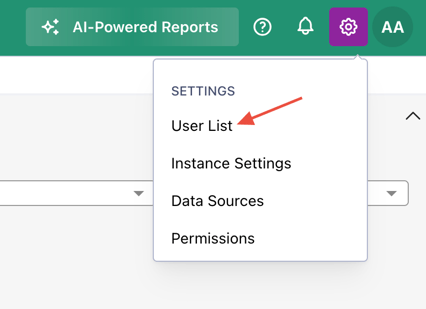
Cog icon (⚙) in the upper-right corner of the top bar |
|
User List |
Listed as an item in the left sidebar |
Inside Settings (⚙) → User List |
|
Profile Controls |
Mixed into the left sidebar navigation |
Upper-right corner, separate from the Settings cog |
|
SubID Reports |
Multiple separate report screens in the Reports section |
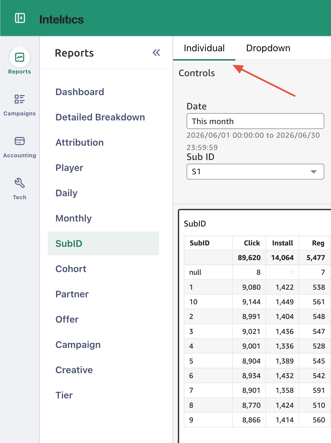
Consolidated into a single SubID screen with Individual / Dropdown tabs |
Where to Find Each Item
Dashboard → Reports > Dashboard
Dashboard is now the first item inside the Reports section of the left sidebar. It remains your default landing page when you log in, nothing about the view itself has changed.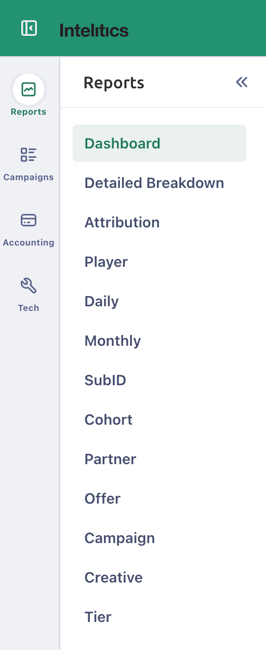
Settings → Cog Icon (⚙) in the Top Bar
Settings has moved out of the left sidebar and into the cog icon (⚙) in the upper-right corner of the top bar. Click the cog to access Instance Settings, Data Sources, Permissions, and User List.
User List → Settings (⚙) > User List
User management has moved from the left sidebar into Settings. To access it click the cog icon (⚙) in the upper-right, then select User List.
SubID Reports → Reports > SubID (consolidated)
Previously separate SubID report screens have been merged into a single SubID page inside the Reports section. Use the Individual and Dropdown tabs at the top of the screen to switch between views.
Offers Page click function
Previously you would be able to click into an Offer's details by clicking anywhere in the row for the desired Offer. You will now need to click on the arrow towards the end of the row in order to access the Offer's details. This change was made to better align with similar pages in our system (ex:brand page) where you would need to click on the arrow at the end of the row to access the details and due to there being clickable elements within a row for an offer (ex:Brand column). 