
Intelitics client integration guide: setup, domains, click and conversion tracking, external tracking, revenue import, and GraphQL Data API.
Andrew Alvarado
Appsflyer Integration (Deprecated)
Instance build SLAs from kickoff to admin login: task owners, day-by-day timelines, and how client delays shift the rest of the schedule.
Instance Build SLAs
Instance build SLAs from kickoff to admin login: task owners, day-by-day timelines, and how client delays shift the rest of the schedule.
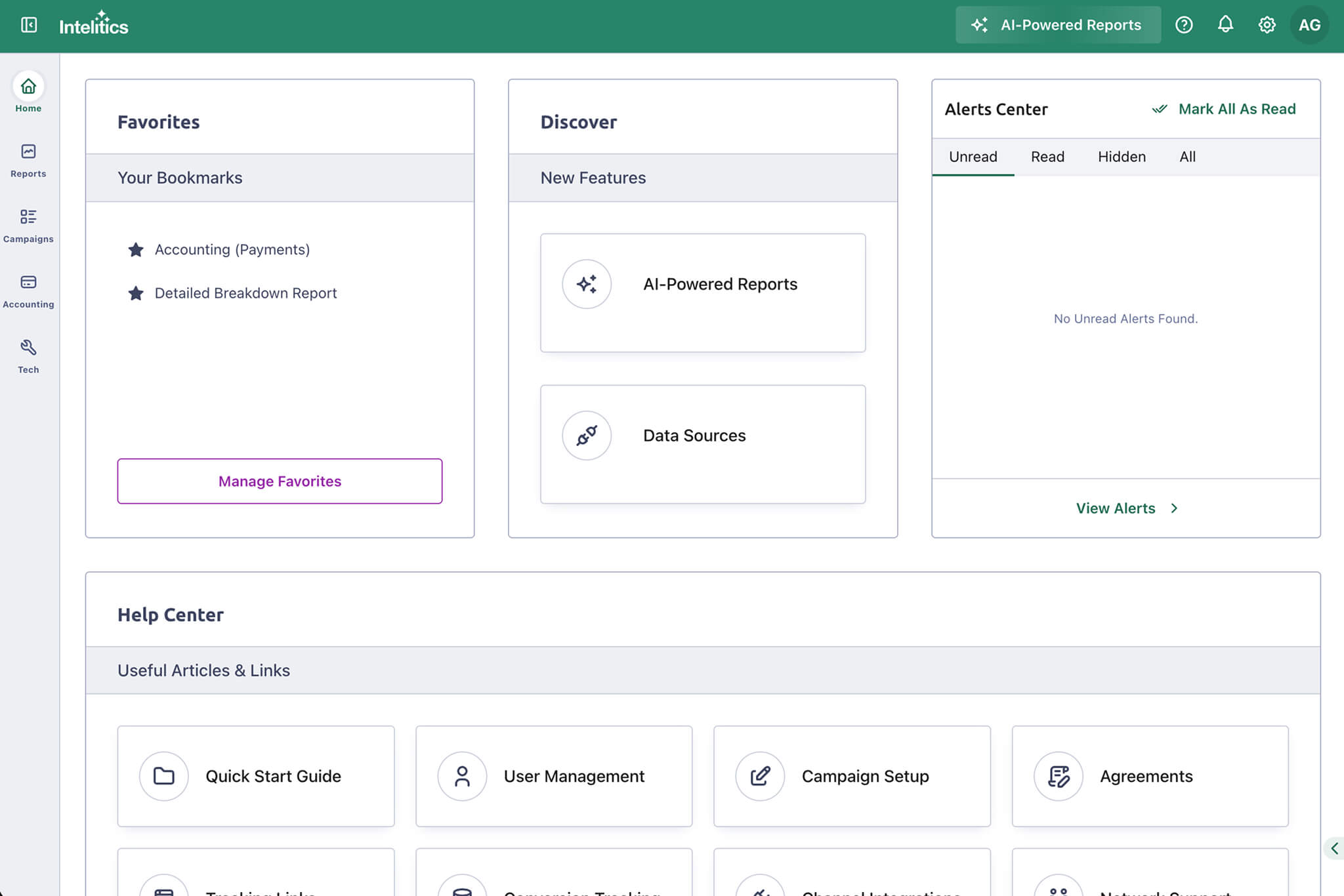
Introducing the New Intelitics Home Page
The new Intelitics Home page adds Favorites, a notification dock, feature highlights, and faster support access. Here is what changed.
How to Install Intelitics SDK
Learn how to install and configure the Intelitics SDK to track user activity, conversions, and campaign performance.
Channel Ingestion Introduction
Learn how to connect data sources to Intelitics, import channel data, configure postbacks, and manage supported integrations.
Channel Ingestion AppsFlyer
Set up your AppsFlyer data source in Intelitics using an access token—learn how to retrieve or generate one and connect your channel.
Channel Ingestion Google
Step-by-step guide to setting up Google channel ingestion in Intelitics, including conversion events, tracking, and integration setup.
Channel Ingestion Meta
Connect your Meta Business Portfolio in Intelitics, then set up Registration and Deposit events with matching IDs.
Channel Ingestion Snap
Set up Snap channel ingestion: connect your account, generate a pixel External ID, and configure registration/deposit events.
Channel Ingestion TikTok
Connect your TikTok account in Intelitics, generate an External ID, and configure Registration and Deposit events for tracking.
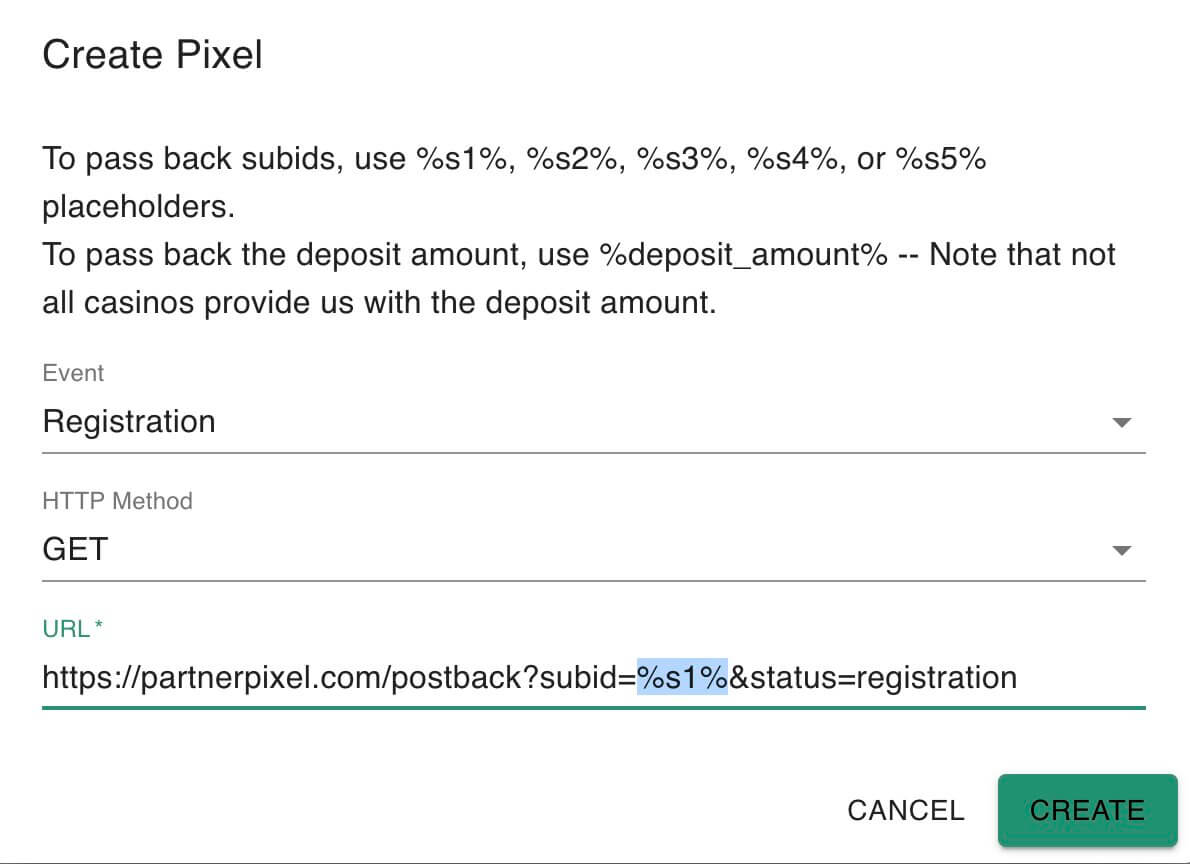
How a Partner can set their Pixels
Guide to setting up partner conversion pixels in Intelitics, covering subID parameters, event types, and pixel configuration steps.
How a Partner can reset their Password
Learn how partners can reset a forgotten password from the login screen using the “Forgot password?” link and email reset instructions.
Generate a tracking link as a Partner
Once your admin has added you to an offer via a subagreement you will have the ability to generate your tracking link. Navigate to the offer you would like to generate a tracking link for:
Instance Settings
Customize your Intelitics instance’s branding, sign-in pages, payment currencies, payout options, and conversion keys.
How to generate a Meta system user access token
Learn how to generate a Meta system user access token for the Conversions API, from Business Settings to token permissions.
How to Download Reports
Download Intelitics reports, by tile or page, as CSV or Excel in a few clicks.
Log-In Issues
Fix login issues from suspicious activity or old cookies—log out, clear cookies, with steps for Chrome, Firefox, Safari.
Pages Not Loading
Fix pages not loading by enabling third-party cookies in Chrome or disabling cross-site tracking blocks in Safari.
Monthly Payments Settings
Configure monthly payment calculations and revenue share ringfencing options, including agreement commission type and brand bundling settings.
Month End Revenue Share Calculations
Learn how Revenue Share ring-fencing zeroes out negative RS at the brand, sub-agreement, or commission-type level to protect other earnings.
Monthly Payment Overview
Manage monthly payment close: run calculations, export reports, record adjustments, and mark payments Paid or Rolled Over.
Monthly Payments Status
Learn how monthly payable statuses—Open, Locked, Closed—control reviews, adjustments, and payment actions like locking and rollover.
Month Close Process
Learn the step-by-step month close process: reviewing open months, locking, marking payments paid/rolled over, and final closing.
How to add an Adjustment
Add or adjust an affiliate’s payout for any month via Accounting > Adjustments — set partner, offer, amount, currency, date, and notes.
Account Pools Introduction
Account Pools pass dynamic, unhardcoded variables in ad creative—like marketing source params—to an Advertiser’s platform.
Creating an Account Pool
Navigate to Campaigns> Pools, click on “+ Account Pool” the following fields will appear
Creating an Account within an Account Pool
Learn to create an account in an Account Pool: pick a partner, set username, add variable fields, and click Create.
Utilize Account Pools and Variables in Offers
Set up Account Pools & Variables in Offers: required pool/account/subagreement setup and %variable_name% syntax for dynamic URLs.
Conversion endpoint access tokens
Generate and secure conversion endpoint access tokens via Conversion Keys in Instance Settings, using the x-access-token header.
Testing for Smart Pixel Conversions
Guide to testing Smart Pixel conversions: generate a tracker link, confirm postbacks with your Operator, and verify via Conversion Manager.
Conversion Management
Manage conversions via Intelitics click ID—view details, track events, add/remove conversions, edit offers.
How to test a Partner’s Pixel
Guide to testing a partner pixel: simulating clicks, capturing the Intelitics clickID, and verifying conversions in Manage Conversions.
Setting up a Partner’s Pixels
Learn to set up partner conversion pixels for install, registration, and deposit events with dynamic subID tracking in Intelitics.
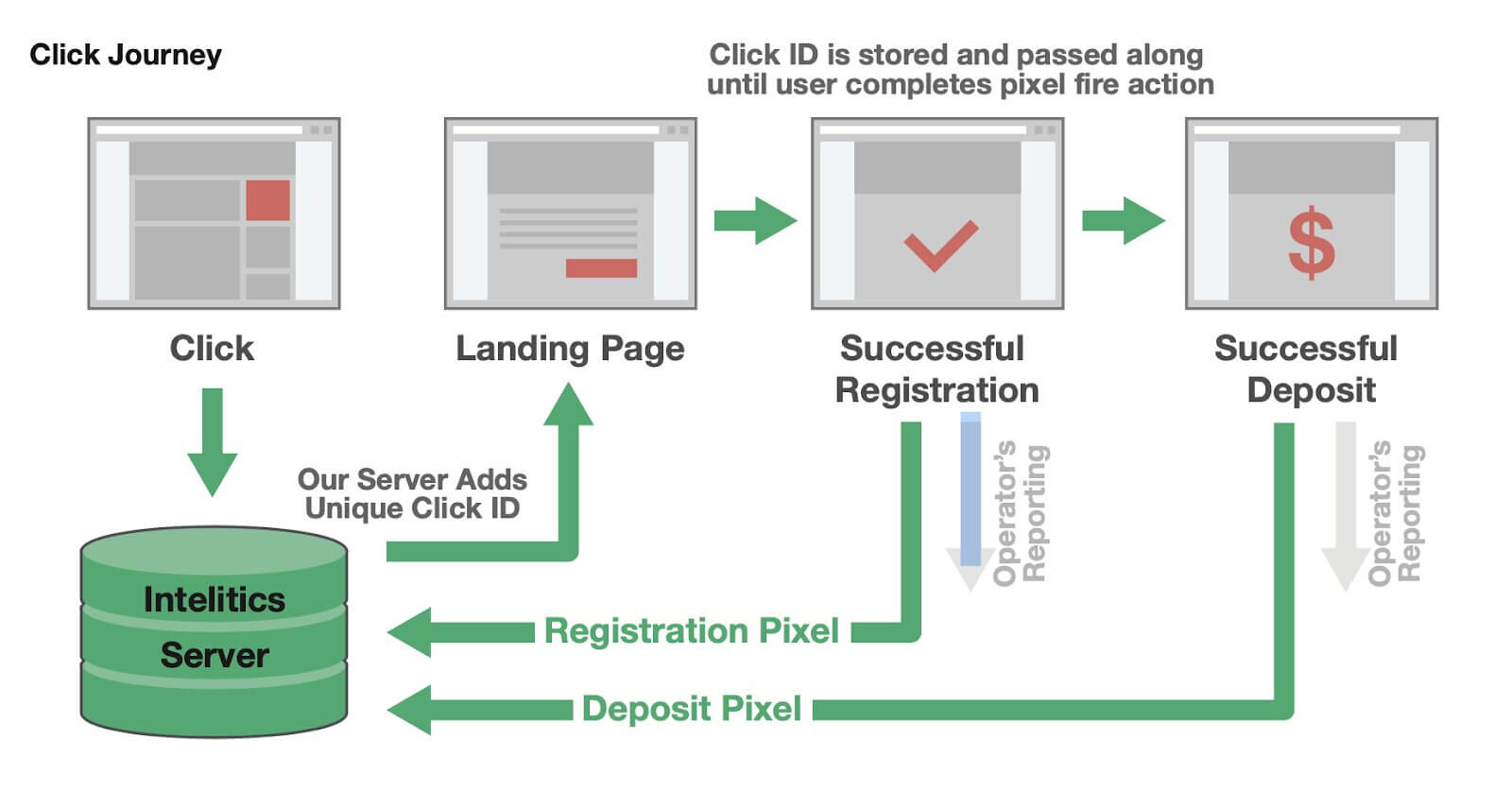
Introduction to Tracking Links
Learn how Intelitics’ server-to-server pixel flow tracks clicks, registrations, and deposits using tracking links and ClickIDs.
Intelitics Tracking Link Structure
Learn Intelitics’ tracking link structure: base URI, required tracking_id/type params, optional subIDs, and example URIs.
Generating a Partner’s Tracking Link
Learn how to generate a partner’s tracking link, set marketing types, and structure SubIDs (s1–s5) for accurate campaign tracking.
What are Agreements
Agreements set the commission structure per Offer, defining partner payouts—via a default agreement or custom overridden terms.
Setting Up a Default Agreement
Learn to set up Default Agreements with CPA, Revshare, Hybrid, and Clawback commission types, plus qualifications and tiered subagreements.
Adding a User to an Agreement (Subagreements)
Add a subagreement to an Offer by adding a user, an account pool if needed, and default or custom payouts—all adjustments are tracked.
Agreement Qualifications
Set up qualifications for offer payouts, like minimum deposits or wager amounts, with deposit windows to control when they must trigger.
Subagreement Grouped Tiers
Set up Subagreement Grouped Tiers to auto-update payouts once players hit deposit or revenue thresholds—up to 5 tiers per Agreement.
Click Grouped Tiers
Set up click grouped tiers on Agreements to pay extra commission when a click meets deposit or wager thresholds—no monthly reset.
Partner Webhook Templates
Speed up configuring partner conversion webhooks with reusable templates for creating or editing subagreements.
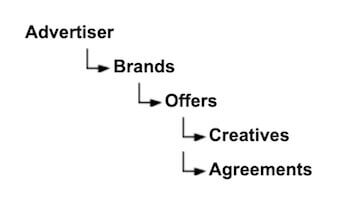
Campaign Setup Introduction
Intelitics campaign hierarchy explained: Advertiser, Brand, Offer, Creative, and Agreement levels, plus how they impact destination links.
Adding an Advertiser
Learn how to add an Advertiser in Intelitics: navigate to Campaigns > Advertisers, click “+ Advertiser,” fill in fields, and create.
Adding a Brand
Step-by-step guide to adding a Brand in Intelitics: navigate to Campaigns > Brands, fill in key fields, and click Create.
Adding an Offer
Learn how to add an Offer in Intelitics: navigate to Campaigns > Offers, configure key fields, and click Create.
Adding a Creative
Learn how to add a creative in Campaigns > Offers—set name, language, destination link, image, and visibility settings.
Destination Link Hierarchy
Set default tracking links at the brand, offer, or creative level—unspecified links inherit from the next level up in the hierarchy.
Tracking Link Append
Set tracking params once via Destination Link Append, auto-applied hierarchy-wide, independent of Destination Links.
Destination Tracking Link Supported Values
Supported token placeholders (click/partner/creative ID, subIDs, ad click ID, timestamp) for Destination Tracking Links in Intelitics.
Offer Pools
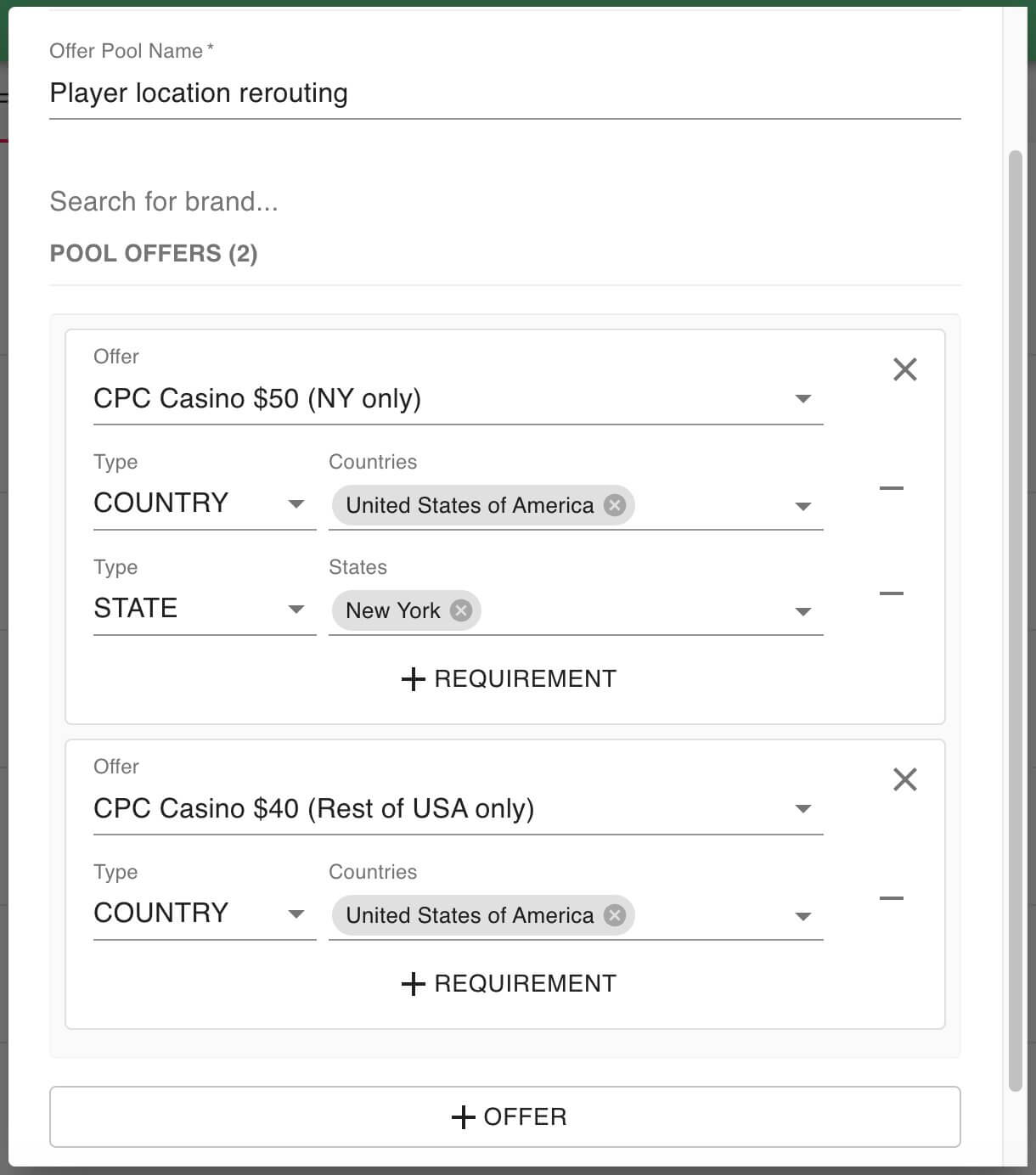
Reroute traffic between offers based on location or conversion type. Learn how Offer Pools work and how to set one up in Campaigns > Offers.
How to View Offers as a Partner
See offers, reporting, and creatives from a partner’s perspective in Intelitics using Partner View—then exit back to admin view anytime.
How to Reset a User Password
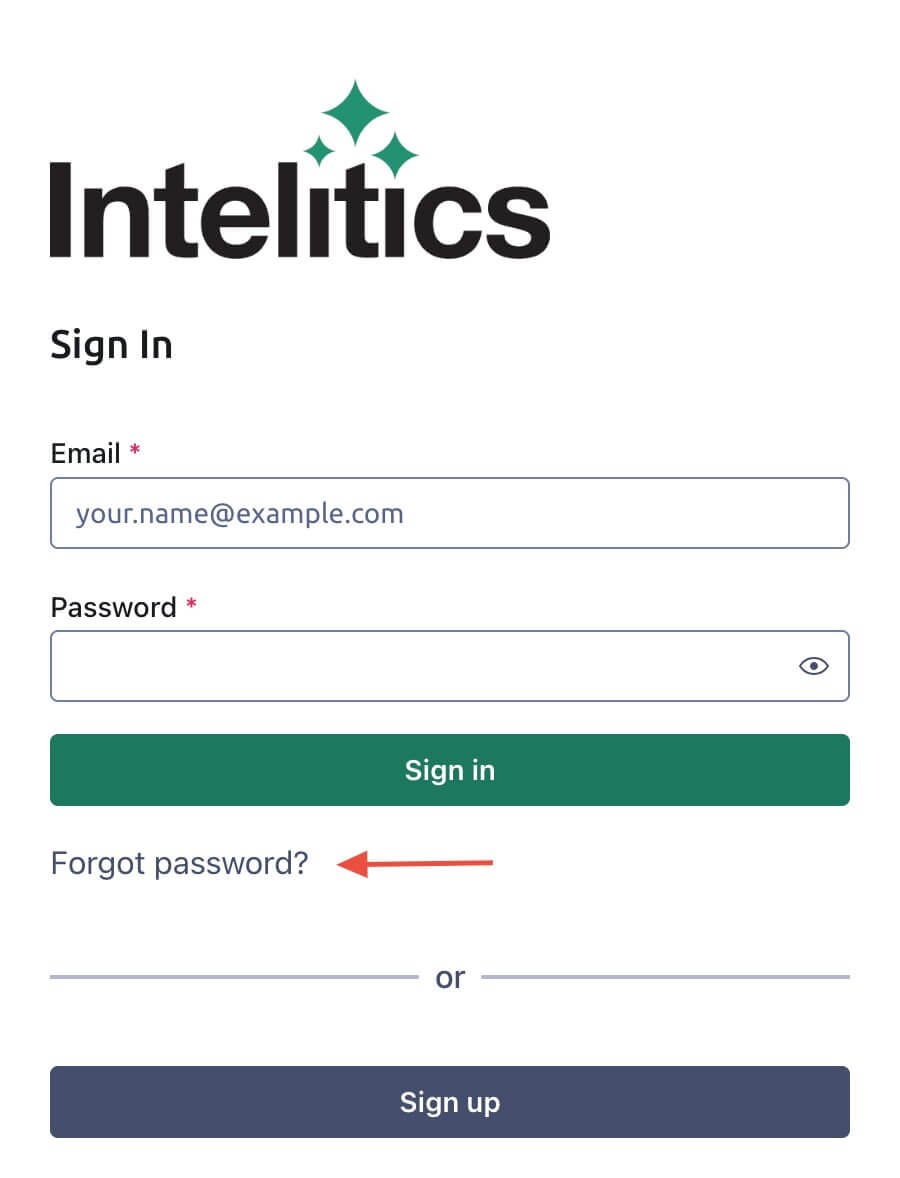
Reset your password via the login page’s “Forgot password?” link, or admins can share the /forgot-password URL to start the process.
Adding a User Referral
Link a partner referrer to a referee: edit the referrer, search for the partner, set earnings/revshare percentages, then hit Update.
Adding a New User/Partner
Learn how to add users and partners, set roles, and manage permissions on the platform in a few simple steps.
Creating your First Campaign
Step-by-step guide to creating your first campaign: set up an Offer, Agreement, Creative, and generate a tracking link to start testing.
Getting Started with Intelitics
Getting started with Intelitics: set up instance settings, add users, build Offers and Agreements, add Creatives, and confirm tracking.